
Introducing KChat: A Next-Gen RAG-GPT Chatbot

KChat is a groundbreaking chatbot powered by Retrieval-Augmented Generation (RAG) technology, designed to harness the power of large language models (LLMs) while rooting responses in the factual, curated content that you provide.
This approach ensures that responses are accurate, contextually relevant, and, most importantly, grounded in real data. Let’s dive into what KChat can do for your organization and why it stands out in the RAG space.
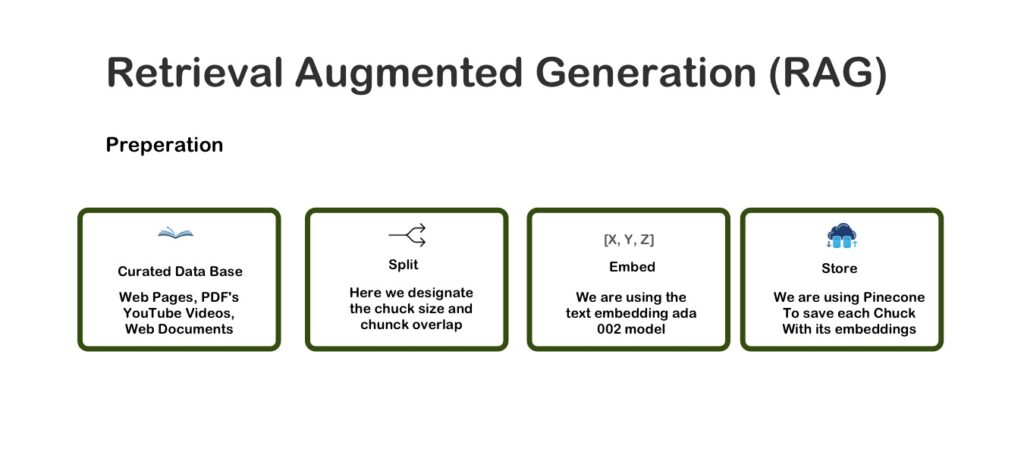
What is Retrieval-Augmented Generation (RAG)?
RAG technology combines two powerful components: **retrieval** and **generation**. Here’s how they work together to create an exceptional chatbot experience:
- Retrieval: This component searches through a database or content library to find documents or information relevant to a user’s query.
- Generation: Using the power of an LLM, this component crafts responses based on both the retrieved data and the model’s inherent language generation capabilities.
The result? More precise, informative, and context-aware responses, as the model pulls from your content and references specific sources when providing answers.
Key Benefits of KChat RAG GPT for Digital Marketing and Customer Engagement
KChat is built to bring your curated content to life across various applications. Here are some powerful ways KChat can support digital marketing, customer support, and content management:
Content Repurposing and Marketing
Use Case: KChat can take your existing content—such as articles, blog posts, or webinars—and generate new, contextually relevant content by drawing from and rephrasing past materials.
Benefits: By repurposing content, you can reach new audiences, maintain consistency in messaging, and extend the life of your marketing assets. This boosts brand awareness and strengthens lead generation through fresh, re-engaged content.
Customer Support and FAQ Automation
Use Case: Whether it’s product details, troubleshooting, or answering FAQs, KChat delivers fast, reliable responses directly drawn from your curated knowledge base.
Benefits: Faster response times mean happier customers, fewer repetitive queries for your support team, and a streamlined customer experience that builds trust and reduces operational costs.
Content Curation and Knowledge Management
Use Case: KChat helps you organize and search through extensive content libraries, synthesizing relevant information and even providing links to full documents for further exploration.
Benefits: KChat enhances accessibility and organization, streamlining knowledge management processes and ensuring that the right information is always just a query away.
How KChat Optimizes RAG with Curated Knowledge Management
KChat sets itself apart from traditional RAG models by emphasizing user-driven content curation and management.
Instead of simply uploading documents to an opaque system, KChat allows users to curate and edit their knowledge base transparently using Kurator—our web browser extension designed to offer complete control over the content in your knowledge base.
Here’s why that’s significant:
Direct Content Editing: With KChat, you can make edits directly within the source documents, improving accuracy and relevance in responses.
Reduced Hallucination: Since the content is edited and curated in context, responses are more precise, minimizing instances where the model might generate inaccurate information.
Enhanced Relevance and Ranking: Contextual content editing ensures that KChat’s retrieval algorithms can better match user queries with relevant, well-integrated responses.
Why Contextual Editing is Vital for RAG Success
Editing source content within the context of your knowledge base offers substantial advantages over adding external notes or separate documents. Here’s why contextual integration matters:
Increased Relevance and Accuracy
Directly editing the content ensures that all information aligns with potential user queries, resulting in accurate and contextually consistent answers. This approach makes responses more trustworthy, as all information flows from a cohesive source.
Improved Retrieval and Ranking
Embedding keywords and relevant data directly within the document boosts KChat’s ability to retrieve the most relevant content, ensuring users get the most useful answers, not just the most generic ones.
Streamlined Summarization and Control
When information is embedded contextually, it reduces the need for extensive prompt engineering and enables smoother, more accurate summarization.
Consistency in Content Flow and Reader Experience
By editing content in context, KChat maintains a coherent narrative and structure, ensuring that information is presented logically for both AI-driven responses and human readers.
Simplified Content Management and Updates
Embedding data within the document itself simplifies updates, making version control easier and reducing the risk of conflicting information.
How to Build and Manage Your Knowledge Base with KChat and Kurator
Creating a knowledge base in KChat is simple with Kurator, which offers a transparent way to manage, curate, and edit content.
Here’s a step-by-step guide to setting up your knowledge base:
Use Kurator: Start by collecting your content (articles, guides, FAQs) in Kurator, where you can organize and edit it before uploading it to KChat.
Upload to KChat: Once your content is organized, sync it to KChat. This establishes your knowledge base, creating an index of information that KChat can reference.
Retrain with Updates: Any time you make updates or add new content, you’ll need to retrain the knowledge base to incorporate these changes. Depending on your plan, KChat provides a set number of retraining sessions per month.
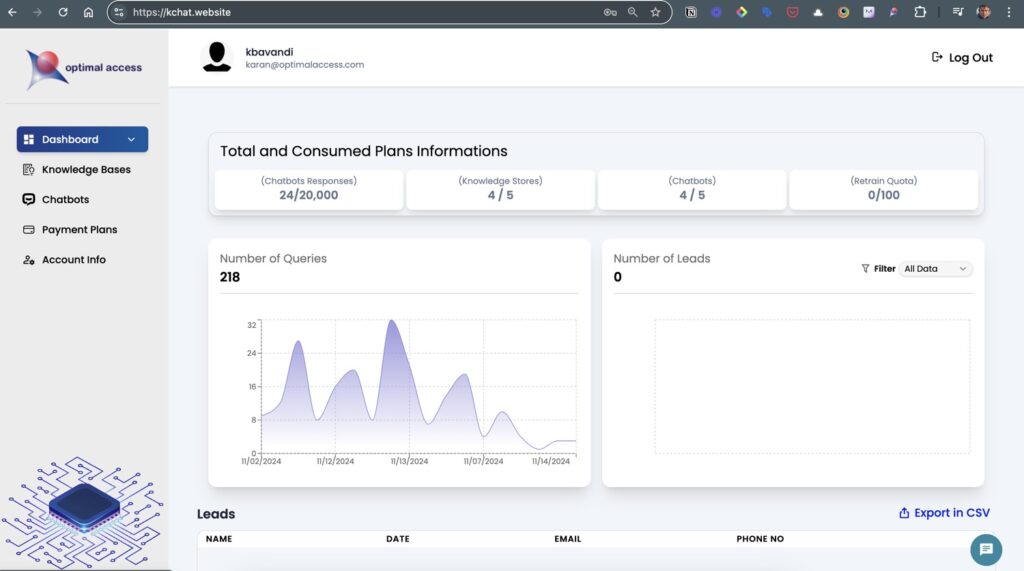
KChat Dashboard: Features and Navigation
The KChat dashboard is designed to help you manage and monitor your chatbot and knowledge base with ease. Here’s a quick breakdown of the primary sections:
Analytics: View data on chatbot interactions, including visitor engagement metrics.
Knowledge Base: Manage your content, sync updates, and monitor the state of your knowledge base.
Chatbots: Customize your chatbot’s appearance, set an introductory message, and test it before deploying.
Account Information: Review your plan details and monitor retraining limits and usage.
Each page is optimized for ease of use, allowing you to seamlessly monitor and refine your chatbot’s performance and content.
Building Your Chatbot: Step-by-Step Guide
Setting up your chatbot in KChat is a straightforward process once your knowledge base is ready.
Here’s a step-by-step guide to help you create and customize your chatbot, from configuring its connection to your knowledge base to deploying it on your website.
Set Up Your Knowledge Base
Begin by uploading and syncing your content on the Knowledge Base Page:
Create and Name Your Knowledge Base: Assign a clear, descriptive name to your knowledge base for easy identification.
Enter the Knowledge Base URL: Add the URL for your knowledge base file from the Kurator app.
Provide a Website URL: Input your KBucket page URL (not your main website URL) if you want users to access content through the KBucket hub on your WordPress site. If you plan to use the source link, and don’t have a WordPress website, simply add your website URL.
Retrain Your Chatbot: Everytime you make changes to your chatbot content in Kurator, use the retrain button of your Knowledge base to update your chatbot content
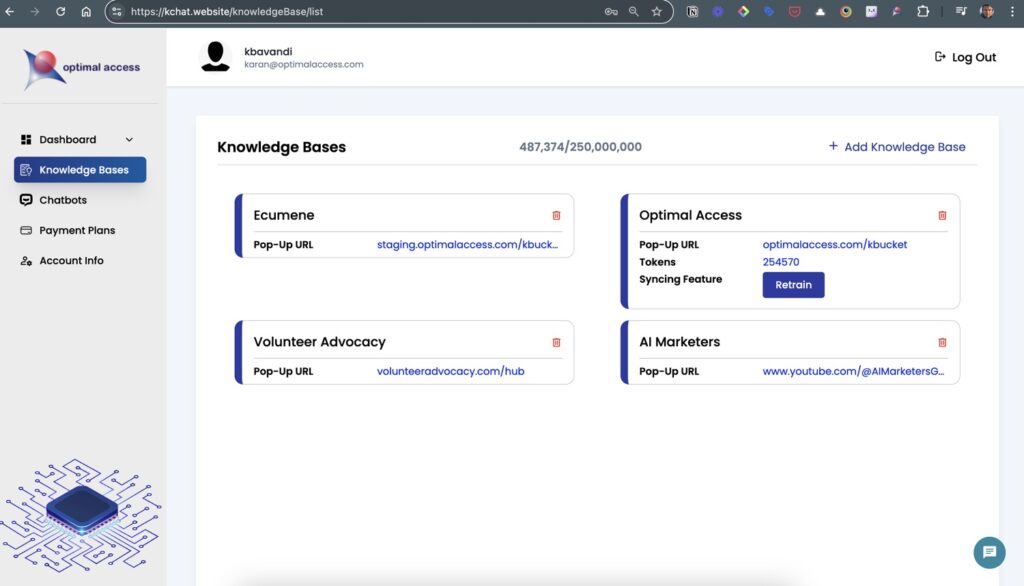
After setting up your knowledge base, remember that retraining is necessary every time you add or update content.
Monthly retrains are limited based on your plan, so plan updates accordingly.
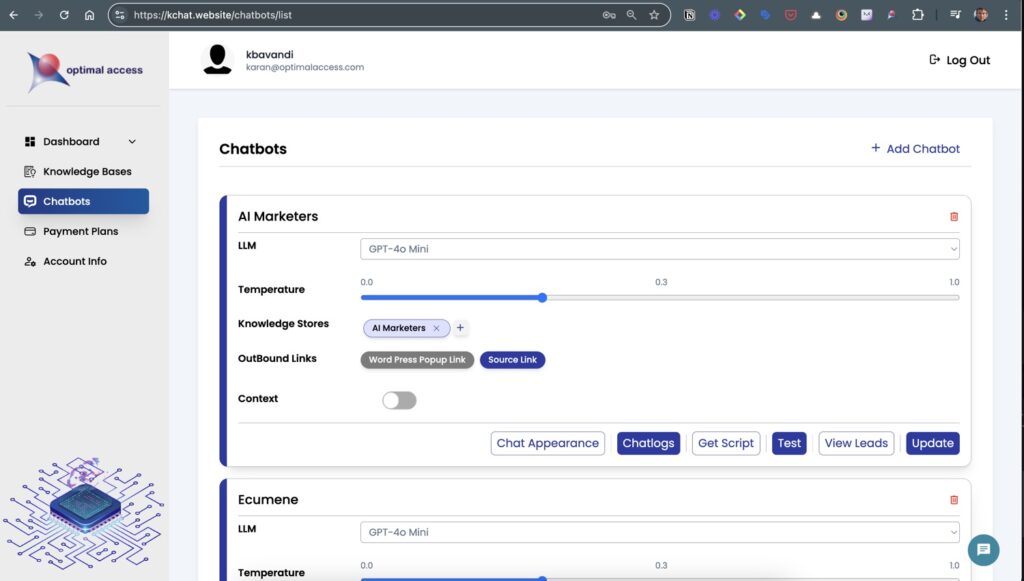
Create Your Chatbot
With your knowledge base ready, move to the ChatBot Page to start building your bot:
Name Your Chatbot: Choose a name that reflects the chatbot’s purpose.
Select the Language Model (LLM): Pick between GPT-3.5 and GPT-4 Mini based on your requirements.
Attach the Knowledge Base: Link the knowledge base you created in Step 1 to this chatbot.
Define Outbound Link Settings: Select your preferred link structure—either direct links to content or links through your KBucket hub.
Customize Appearance and Messaging
Once your chatbot is created, personalize it to align with your brand’s look and feel:
Adjust Appearance: Use the appearance settings to tailor your chatbot’s visual design.
Set the Opening Message: Create a welcoming message that clearly describes how the chatbot can assist users.
Test and Deploy Your Chatbot
Test Functionality: Use the built-in test function to ensure your chatbot performs well and retrieves accurate answers.
Deploy: To add your chatbot to a webpage, simply copy the embed code and place it in the footer or body of your website.
With these steps, you’ll have a fully operational, custom chatbot ready to engage users, answer questions, and provide reliable, content-driven assistance!
Using Chat Logs for Customer Insights and Content Optimization
The chat logs in KChat are an invaluable resource for gathering insights into customer needs and preferences. By reviewing the logs, you can:
Identify Gaps in Knowledge: Discover frequently asked questions that your current content doesn’t fully address and add this information to your knowledge base.
Enhance Content: Use user queries as a basis for expanding or refining your content library, creating more comprehensive answers for future interactions.
Guide Content Creation: Align your content strategy with real customer inquiries, ensuring you’re always addressing relevant topics.
Remember: The more comprehensive your knowledge base, the more accurately KChat can respond to queries, so invest in creating well-rounded, robust content for your chatbot.
Conclusion: Why use KChat
KChat combines the power of RAG with a curated, editable knowledge base, making it an exceptional choice for content creators and digital marketers alike.
By offering a user-friendly way to manage, edit, and update your content, KChat maximizes relevance and accuracy in chatbot responses, delivering high-value interactions every time.
For content marketers, KChat offers a powerful tool to repurpose and extend the reach of your existing content, while for customer support teams, it reduces the load by providing immediate answers to frequently asked questions.
With the combined power of KChat and Kurator, you can build a smarter, more responsive AI-driven experience that engages users and drives results.
To get started, download Kurator and set up your knowledge base, then log into KChat and bring your content to life!
To see KChat, Kurator, and KBucket—our WordPress landing page—in action, ask the chatbot on this page how to get started with Kurator and KChat.
1 thought on “Introducing KChat: A Next-Gen RAG-GPT Chatbot”
Comments are closed.
Pingback: Craft Smarter Prompts in Kurator with the WISE Framework - Optimal Access